Restaurant Recipe Cards:
Automated Recipe Management
Standardize recipes, control food costs, and improve quality with automated recipe card management for your cafe or restaurant.
Every chef has their own way of making the same dish. Portions vary, ingredients change, and costs become unpredictable. Without standardized restaurant recipe cards, you can't control quality or calculate accurate food costs. Digital recipe management solves these problems.
Problems Without Standard Recipes
When recipes live in chefs' heads or on crumpled paper, consistency disappears. New cooks can't replicate dishes. Food costs are guesswork. Menu pricing becomes random. Quality varies between shifts.
Common Recipe Management Problems
Real Impact: Restaurants with standardized recipes reduce food costs by 5-10% and improve consistency scores by 40% or more.
What Goes in a Recipe Card
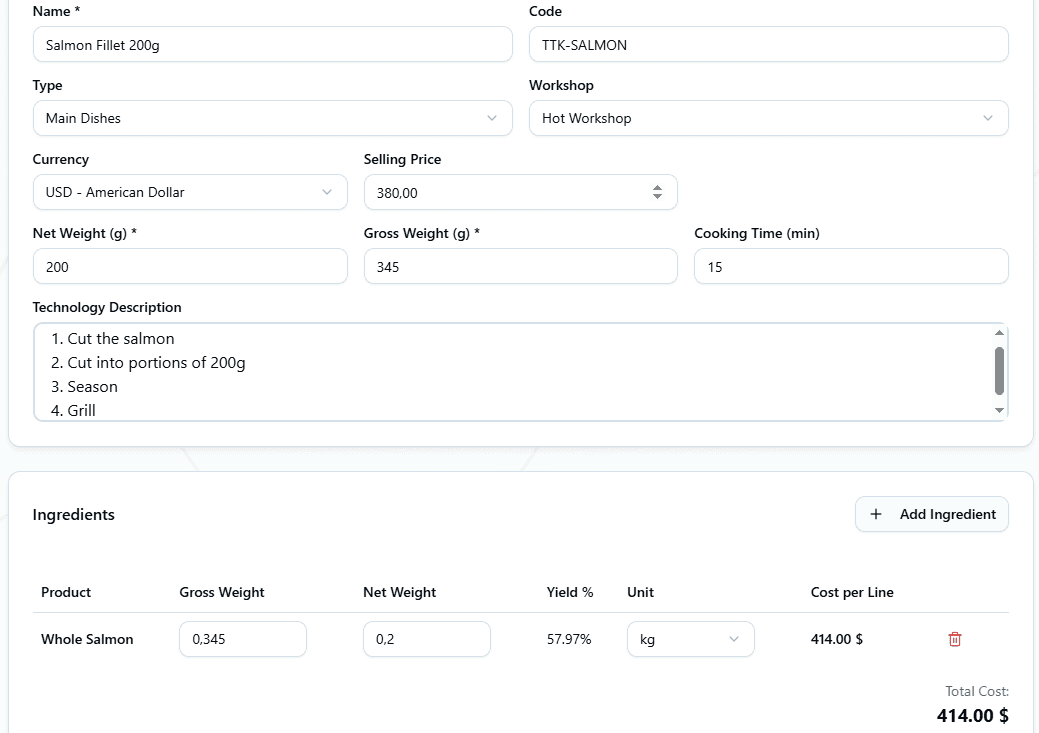
A complete HoReCa system recipe card (also called TTC - Technical-Technological Card) contains everything needed to prepare a dish consistently:
Basic Information
Technical Details
Ingredient Management
Each ingredient in your recipe management food service system needs specific details:
Ingredient Details
Select from your product database
Raw ingredient weight (e.g., 320g chicken with bones)
Cleaned/trimmed weight (e.g., 250g boneless chicken)
System calculates: (Net ÷ Gross) × 100%
Uses current product price × quantity
Automatic Cost Calculation
The system calculates food cost automatically for perfect dish control:
How Cost Calculation Works
1Get Product Price
System pulls current purchase price from product catalog
2Convert Units
Automatically converts between kg, g, L, ml, pieces
3Calculate Line Cost
Multiplies ingredient quantity by unit price
4Sum Total Cost
Adds all ingredient costs = dish food cost
Real Example: Ribeye Steak 250g
If menu price is $35, food cost is 27.6% - within ideal 25-30% range
Recipe Categories
Organize recipes by type for easier management:
🍖 Finished Dishes
Complete menu items served to customers
🥘 Semi-Finished Products
Prep items used in multiple dishes
🍚 Sides & Garnishes
Accompaniments to main dishes
🧁 Pastry & Desserts
Sweet items from pastry station
Kitchen Stations
Assign recipes to specific kitchen areas for workflow organization:
Hot Kitchen
Cold Kitchen
Pastry Station
Creating Recipe Variations
Duplicate existing recipes to create variations quickly through recipe card automation:
Different Portion Sizes
Create 150g, 250g, 350g versions of same dish
Example: Copy "Salmon Fillet 200g", adjust quantities, save as "Salmon Fillet 300g"
Seasonal Variations
Adapt recipes for different seasons
Example: "Summer Salad" → "Winter Salad" with seasonal vegetables
Dietary Adaptations
Create vegetarian, vegan, or gluten-free versions
Example: "Beef Burger" → "Vegetarian Burger" with plant-based patty
Time Saver: Duplicating takes 30 seconds vs 10 minutes creating from scratch. Make variations without losing the original.
Preparation Instructions
Write detailed cooking instructions so anyone can reproduce the dish:
Example: Pan-Seared Ribeye Steak
Remove steak from refrigerator 30 minutes before cooking. Pat dry with paper towels. Season generously with salt and pepper on both sides.
Heat heavy skillet (cast iron preferred) over high heat until smoking. Add 15ml oil, swirl to coat pan.
Place steak in pan. Cook without moving for 4 minutes until dark crust forms. Flip once, cook 3-4 minutes for medium-rare.
Add butter, garlic, and herbs to pan. Tilt pan, baste steak with melted butter for 1 minute.
Transfer to plate, let rest 5 minutes before serving. Internal temperature should reach 54-57°C for medium-rare.
Writing Tips
- →Include temperatures and cooking times
- →Specify equipment needed (pans, tools)
- →Note visual/texture cues (golden brown, tender)
- →Add plating and garnish instructions
Photos and Visual Standards
Add photos to show exactly how finished dishes should look:
Why Photos Matter
- ✓Quality control standard
- ✓Training reference for new cooks
- ✓Plating consistency
- ✓Marketing materials ready
Photo Best Practices
- →Good lighting, clean background
- →Show actual portion size
- →Include garnishes
- →Update when presentation changes
Printable Recipe Cards
Generate PDF versions to post in kitchen stations:
PDF Recipe Card Includes
Pro Tip: Laminate printed recipe cards and hang at each station. Update when recipes or prices change.
Best Practices
- •Update prices monthly: Accurate costs require current ingredient prices
- •Test recipes thoroughly: Cook multiple times before finalizing portions
- •Include yield percentages: Shows expected loss from trimming/cooking
- •Write detailed instructions: Anyone should be able to follow them
- •Use high-quality photos: Shows plating standards clearly
- •Review recipes quarterly: Update for ingredient availability and costs
- •Train staff properly: Make recipe cards part of onboarding
Benefits of Digital Recipe Management
Quality & Consistency
- • Every dish tastes the same
- • Portion sizes stay consistent
- • Visual standards maintained
- • New cooks trained faster
- • Customer satisfaction improves
Cost Control
- • Know exact food costs
- • Price menu items correctly
- • Track cost changes over time
- • Reduce ingredient waste
- • Improve profit margins
System Integration
Recipe cards connect with your entire restaurant operation:
🔪 Butchery Acts
Compare actual yields against recipe standards
📦 Product Catalog
Pull current prices for automatic cost updates
📊 Menu Pricing
Calculate ideal menu prices from food costs
🛒 Ordering
Calculate ingredient needs from recipe quantities
Standardize Your Kitchen
Stop guessing portions and food costs. Digital restaurant recipe cards bring consistency, control costs, and improve quality across every shift.
From automatic cost calculations to printable kitchen cards, ingredient tracking to yield control - give your kitchen the recipe management system it deserves.
Ready to standardize your recipes? Start managing recipe cards digitally today.
Free to start. No credit card required.
By continuing you agree to our Terms.