Restaurant Inventory Management:
Automated Tools & Best Practices
Identify discrepancies, minimize losses, and maintain organized warehouse operations with efficient automated inventory methods.
Every restaurant loses money through inventory discrepancies. Products expire, staff make counting errors, and theft happens. Regular restaurant inventory audits help you catch these problems early and maintain accurate stock records. Automated systems make the process fast and reliable.
Why Regular Inventory Audits Matter
Without regular counts, you never know your true inventory levels. Your system might show 50 kg of flour, but the actual amount could be 42 kg. This 8 kg difference represents lost money and incorrect cost calculations. Stock control food service systems solve this problem.
Common Inventory Problems
Real Cost: A typical restaurant loses 2-5% of revenue to inventory shrinkage. For a $500k annual revenue restaurant, that's $10k-$25k lost every year.
Automated Inventory Templates
A good HoReCa inventory system uses templates to schedule regular counts automatically. Instead of remembering to count inventory, the system creates tasks for you at the right time.
Schedule Types
📅 Daily Counts
Count specific items every day at a set time. Perfect for high-value or fast-moving products.
Example: Fresh seafood, premium cuts of meat, alcohol
📅 Weekly Counts
Count categories once per week, starting from a specific date. Good for medium-turnover items.
Example: Dry goods, canned products, frozen items
📅 Monthly Counts
Full inventory on a specific day each month. Covers everything for complete accuracy.
Example: Full restaurant audit, end-of-month reconciliation
Creating Templates
Set up a template once, and it runs automatically forever. Specify:
- →Template name: "Daily Meat Refrigerator Count"
- →Schedule type: Daily, weekly, or monthly
- →Time: When the count should happen (e.g., 6:00 AM)
- →Products: Which items to count
The Counting Process
When it's time for an inventory automation count, staff follow a simple process:
Open the Count Task
Task appears on dashboard at scheduled time. Select template or create one-time count.
Count Physical Stock
Go to warehouse, count each product, enter actual quantities in system.
Review Discrepancies
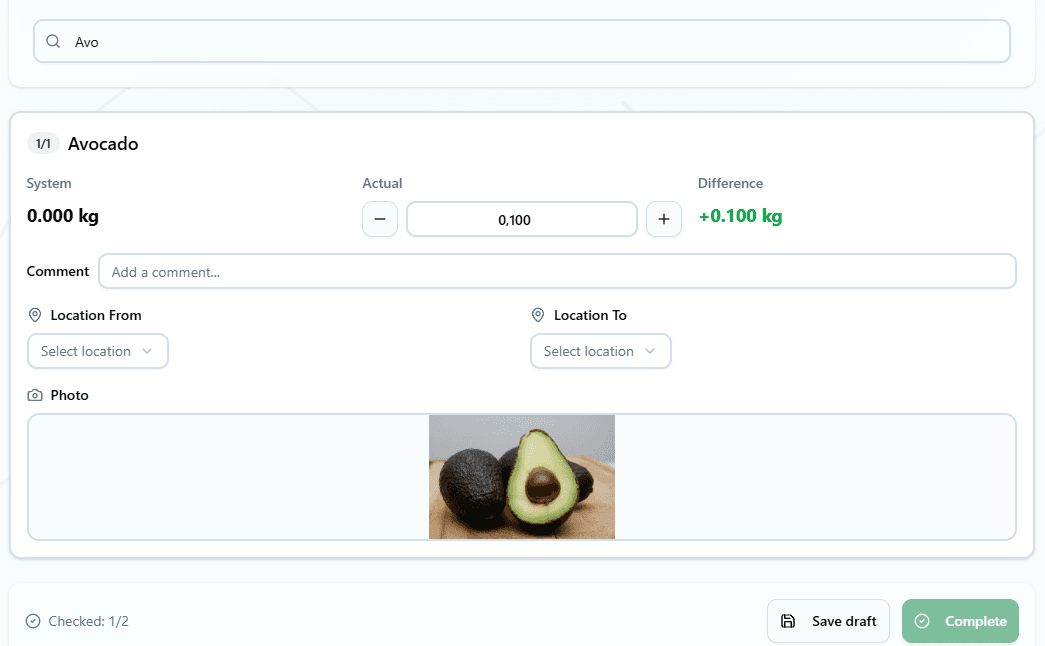
System automatically calculates differences between expected and actual amounts.
Document & Confirm
Add comments explaining variances, attach photos if needed, confirm the count.
Understanding Discrepancies
The system compares your physical count against expected inventory. This cafe audit process reveals two types of discrepancies:
📈Overages (Surplus)
Physical count is higher than system records.
Common causes: Unreported deliveries, counting errors, system entry mistakes
📉Shortages (Shrinkage)
Physical count is lower than system records.
Common causes: Theft, waste not recorded, over-portioning, spoilage
Document Everything
For each discrepancy, add comments explaining the reason:
- • "Found expired products removed from system"
- • "Staff meal not recorded properly"
- • "Spillage during prep this morning"
- • "Delivery received but not entered in system"
Automatic System Updates
When you confirm an inventory count, the system immediately performs several actions:
Updates Stock Levels
System inventory matches your physical count exactly. No more discrepancies.
Records Adjustments
Creates adjustment entries for overages and shortages with your comments.
Updates Movement History
Maintains complete audit trail of all inventory changes and who made them.
Completes Dashboard Task
Removes the count task from your to-do list. Next count appears at scheduled time.
Dashboard Integration
Your templates create tasks automatically on the dashboard. Staff see exactly what needs counting today:
📋Today's Inventory Tasks
Flexible timing: You can complete counts before the scheduled time. Tasks remain active until finished, even if you miss the original time.
Best Practices for Accurate Counts
- •Count at consistent times: Same time each day/week means comparable results
- •Count before service: Early morning counts avoid busy period confusion
- •Use two people: One counts, one enters data for accuracy
- •Organize storage first: Well-organized areas are faster to count
- •Take photos of discrepancies: Visual evidence helps investigations
- •Always document reasons: Understanding why helps prevent future issues
- •Review trends monthly: Look for patterns in shortages and overages
Recommended Count Schedule
Different products need different counting frequencies:
🔥Daily Counts
High-value and fast-moving items:
📅Weekly Counts
Medium-turnover and specialty items:
📆Monthly Counts
Complete inventory and slow-moving items:
Benefits of Regular Inventory
Financial Benefits
- • Reduce shrinkage by 50-70%
- • Accurate food cost calculations
- • Better cash flow management
- • Identify theft quickly
- • Optimize purchasing decisions
Operational Benefits
- • Never run out of key ingredients
- • Prevent food waste from expiration
- • Staff accountability for inventory
- • Organized, efficient storage
- • Better portion control
Integration with Other Systems
Inventory counts connect with your entire restaurant management system:
📦 Product Catalog
Uses product list for counting, updates stock levels automatically
📊 Dashboard
Shows count tasks, tracks completion status
📝 Write-offs
Discrepancies can be documented as waste or loss
⚙️ Settings
Uses units of measurement and product categories
Analyzing Inventory Results
Regular counts create valuable data. Look for these patterns:
🔴 Consistent Shortages
Same products always short? Investigate theft, over-portioning, or unreported waste.
🟢 Consistent Overages
Products always over? Check if deliveries or production aren't being recorded properly.
🟡 Weekend Patterns
Bigger discrepancies on Saturdays? Could indicate staffing or training issues.
🔵 Seasonal Changes
Different patterns in summer vs winter? Adjust your templates and ordering.
Take Control of Your Inventory
Automated restaurant inventory systems eliminate guesswork and reduce losses. Set up templates once, and counts happen automatically at the right time.
Stop losing money to shrinkage. Start counting smarter with automated inventory management that pays for itself in reduced losses.
Ready to reduce inventory losses? Try automated inventory counts today.
Free to start. No credit card required.
By continuing you agree to our Terms.