Incoming Receiving Acts:
Automated Product Receiving
Avoid mistakes, control quality, and optimize warehouse operations in your cafe or restaurant with automated receiving documentation.
Every restaurant receives deliveries daily. Fresh produce, meat, dry goods, beverages - all need proper documentation. A restaurant receiving act helps you track what arrives, verify quantities, record prices, and update inventory automatically. Digital systems make this process fast and error-free.
What is a Receiving Act?
A receiving act is a document that records goods arriving at your warehouse. When a supplier delivers products, you create this document to confirm what you received, at what price, and in what condition. This becomes your official record for inventory and accounting.
Why Digital Receiving Acts Matter
- ✓Verify delivery matches purchase order
- ✓Update inventory instantly
- ✓Track purchase prices automatically
- ✓Monitor supplier performance
- ✓Control product quality on arrival
- ✓Maintain complete audit trail
Common Problem: Without proper receiving documentation, restaurants lose track of deliveries, miss price changes, and struggle with inventory accuracy. This leads to food waste and budget overruns.
Key Features of Automated Receiving Systems
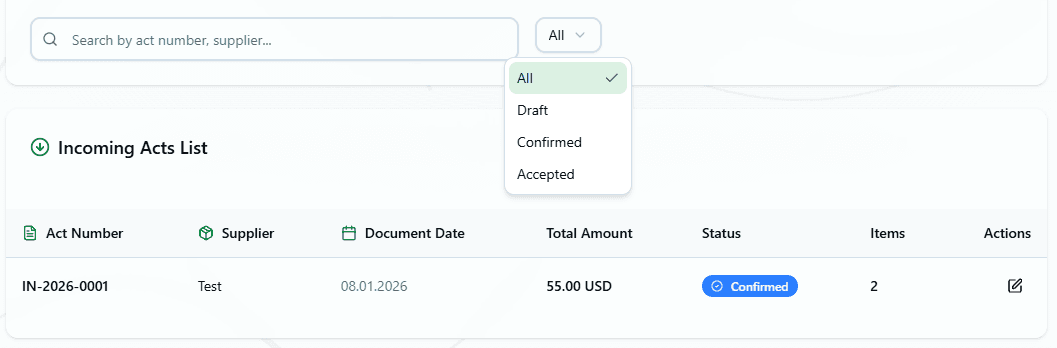
Document List
View all receiving acts with filtering by date, status, and supplier. Each document shows the supplier name, total amount, number of items, and whether it's confirmed or still a draft. This delivery tracking food service system keeps everything organized.
Creating a Receiving Act
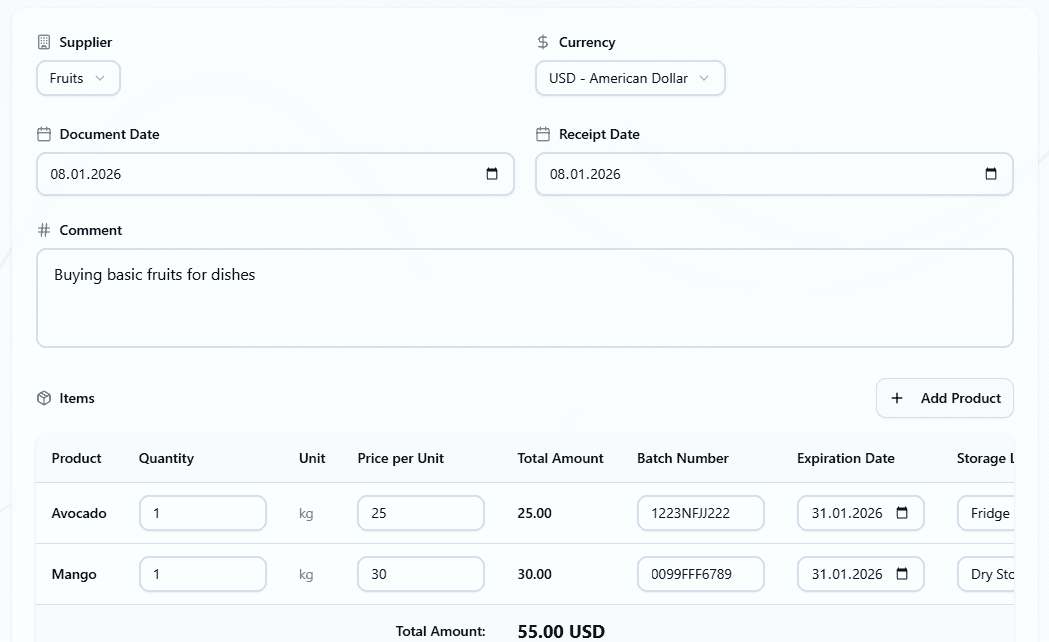
The system provides a simple form for goods receipt automation. You can create a new act from scratch or link it to an existing purchase order for automatic data filling.
Document Details
- • Receiving date
- • Supplier selection
- • Warehouse location
- • Linked purchase order (optional)
- • Comments and notes
Product Information
- • Product name
- • Quantity received
- • Unit of measurement
- • Purchase price
- • Expiration date (if applicable)
- • Batch number (optional)
Automatic Data from Purchase Orders
The smartest feature of a good HoReCa control system is automatic data filling from purchase orders. When you select a purchase order, the system instantly:
Automatic Actions
Real Scenario
You ordered 50 kg of chicken breast, but the supplier only delivered 45 kg. Simply adjust the quantity in the receiving act before confirming. The system will track this variance automatically.
Product Receiving Process
Delivery Arrives
Supplier brings products to your restaurant. Check delivery against purchase order.
Create Receiving Act
Select the related purchase order or create new document. System auto-fills product details.
Verify & Adjust
Check actual quantities and quality. Adjust numbers if delivery differs from order.
Confirm Document
Once confirmed, inventory updates automatically. Purchase prices refresh for cost calculations.
Important: After confirming a receiving act, you cannot edit or delete it. This protects your financial records and maintains accurate audit trails.
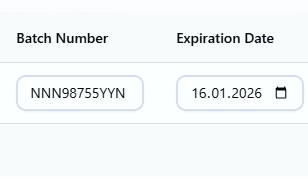
Expiration Dates and Batch Numbers
For perishable products, proper product receiving includes tracking expiration dates and batch numbers:
📅Expiration Dates
Track when products expire to prevent serving spoiled food.
- • Automatic expiration alerts
- • FIFO inventory rotation
- • Prevent food waste
- • Health compliance
🏷️Batch Numbers
Track product batches for quality control and recalls.
- • Trace product origins
- • Quick recall response
- • Quality issue tracking
- • Supplier accountability
What Happens After Confirmation
When you confirm a receiving act, the system automatically performs several actions for complete food service delivery tracking:
✓ Inventory Updates
Product quantities increase in your warehouse automatically. No manual entry needed.
✓ Price Updates
Purchase prices update for accurate cost calculations. You control whether to update or keep existing prices.
✓ Order Status Changes
If linked to a purchase order, that order's status updates to "received" or "partially received".
✓ Movement History
System creates detailed movement records for complete audit trails and reporting.
Price Management Strategy
When confirming receiving acts, you decide how to handle prices:
Update Prices
Recommended for most situations. Keeps cost calculations accurate.
Keep Existing Prices
Use when prices shouldn't change or for special situations.
Pro Tip: Most restaurants update prices with each delivery. This ensures recipe cost calculations reflect current market conditions.
Benefits of Automated Receiving
For Management
- • Real-time inventory visibility
- • Accurate cost tracking
- • Supplier performance monitoring
- • Complete financial audit trail
- • Instant variance detection
For Staff
- • Fast receiving process
- • Less manual data entry
- • Mobile-friendly interface
- • Clear instructions
- • Reduced paperwork
Integration with Other Systems
Receiving acts work seamlessly with other parts of your restaurant management:
📝 Purchase Orders
Automatic data filling from orders, status updates on receipt
📦 Product Catalog
Updates inventory levels and purchase prices automatically
🏪 Warehouse
Products placed in correct storage locations
📊 Recipe Cards
Updated prices flow to recipe cost calculations
Best Practices
- •Document immediately: Create receiving acts right when deliveries arrive
- •Always verify quantities: Check actual delivery against order before confirming
- •Check quality on arrival: Inspect products for freshness and damage
- •Update prices regularly: Keep cost calculations accurate with current market prices
- •Track expiration dates: Essential for perishable items and food safety
- •Use batch numbers: Makes product recalls and quality tracking easier
- •Review before confirming: Double-check all data, you cannot edit after confirmation
Common Scenarios
✓ Perfect Delivery
Everything matches the purchase order. Select the order, system fills data automatically, verify and confirm. Takes less than 2 minutes.
⚠ Partial Delivery
Supplier only brings some items. Adjust quantities in receiving act. Purchase order shows "partially received" status. Remaining items tracked separately.
✗ Quality Issues
Products arrive damaged or expired. Reduce quantity to match only acceptable items. Add comment explaining rejection. Contact supplier about issue.
↑ Price Changes
Supplier prices increased. Update prices in receiving act. System alerts you to variance from purchase order. Track price trends over time.
Reporting and Analytics
Track important metrics with your receiving data:
- →Track deliveries by supplier to identify performance issues
- →Analyze purchase trends to optimize ordering
- →Monitor price changes across time periods
- →Generate receiving reports for accounting
Transform Your Receiving Process
Stop wasting time on manual paperwork. Automated product receiving systems eliminate errors, update inventory instantly, and give you complete control over your supply chain.
From automatic data filling to instant inventory updates, digital receiving acts make your warehouse operations faster and more accurate.
Ready to streamline your receiving process? Start automating today.
Free to start. No credit card required.
By continuing you agree to our Terms.