Restaurant Notes System:
Organize Ideas & Tasks
Improve team communication and quickly solve issues in your restaurant business with organized note-taking and idea tracking.
Every restaurant needs a place to store important information. Recipe variations, equipment instructions, staff procedures, customer preferences - this knowledge gets lost in conversations, text messages, and forgotten notebooks. A digital restaurant notes system keeps everything organized and accessible to your entire team.
Why Digital Notes Matter in Restaurants
Paper notes get lost, WhatsApp messages disappear in chat history, and verbal instructions are forgotten. When your chef remembers a special preparation method or a server notes a VIP customer's preferences, that information needs a permanent home where the whole team can find it.
Common Information Loss Problems
The Solution: A centralized cafe management system for notes means everyone accesses the same information, updated in real-time, searchable in seconds.
Key Features of Restaurant Note Systems
Creating and Managing Notes
Anyone on your team can create notes with rich text formatting. This food service notes automation makes capturing information quick and easy.
What Goes in a Note
Text Formatting
Create professional-looking notes with formatting tools:
- BBold text for important points
- IItalic text for emphasis
- •Bulleted and numbered lists
- HHeaders for sections
- 🔗Links to recipes, products, or procedures
Search and Organization
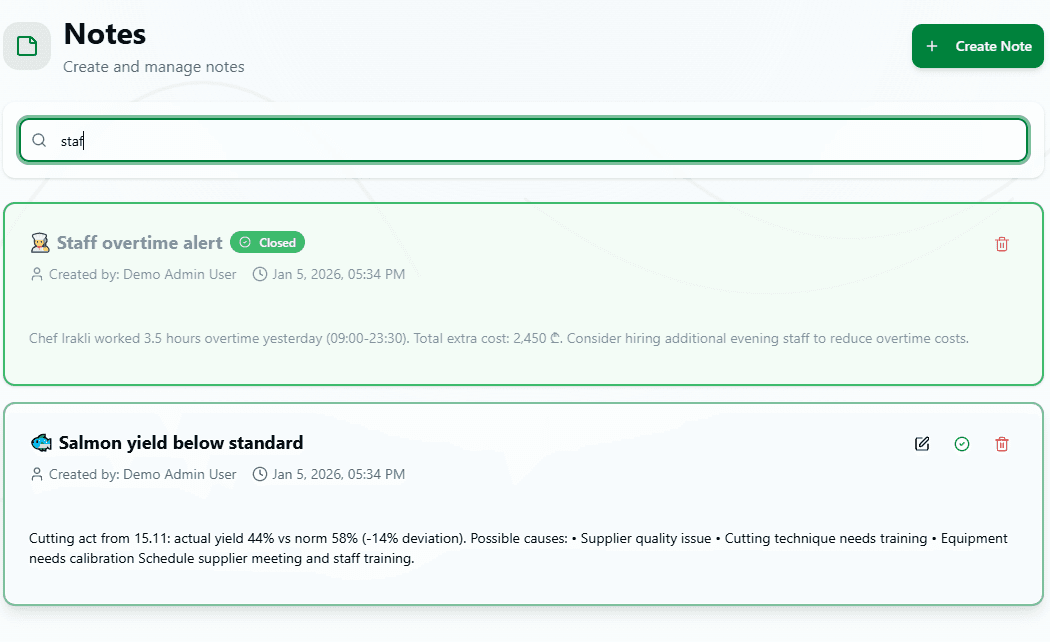
Find information instantly with powerful search. Type keywords and see all related notes immediately. Filter by tags to see only specific categories.
Practical Uses in Restaurant Operations
📋Staff Instructions
Document procedures so everyone works the same way
Example Topics:
- • How to operate the espresso machine
- • Opening and closing procedures
- • Temperature check protocols
- • Cash handling guidelines
- • Customer complaint resolution
👨🍳Recipe Variations & Techniques
Capture chef knowledge and recipe modifications
Example Topics:
- • Special sauce recipe modifications
- • Cooking time adjustments for equipment
- • Plating presentation guidelines
- • Seasonal ingredient substitutions
- • Chef's secret techniques
🔧Equipment & Maintenance
Record troubleshooting tips and maintenance schedules
Example Topics:
- • Oven temperature calibration notes
- • Refrigerator troubleshooting guide
- • Dishwasher maintenance reminders
- • Coffee machine cleaning schedule
- • Equipment supplier contacts
⭐Customer Information
Remember regular customer preferences and allergies
Example Topics:
- • VIP customer preferences
- • Dietary restrictions database
- • Special occasion reminders
- • Complaint resolution notes
- • Corporate client requirements
🛡️Safety & Compliance
Keep health and safety information accessible
Example Topics:
- • Food safety temperature guidelines
- • Allergen handling procedures
- • Fire safety protocols
- • Health inspection checklists
- • Emergency contact numbers
Using Tags for Organization
Tags help categorize notes for quick filtering. This HoReCa task management approach makes finding related information instant.
Common Tag Categories
Department Tags
Tag Best Practices
- →Use 2-4 tags per note for best organization
- →Keep tag names short and consistent
- →Create department tags for area-specific notes
- →Add priority tags like "urgent" or "important"
Team Collaboration Features
Everyone on your team can access, create, and edit notes. This collaborative approach ensures knowledge sharing across all shifts and positions.
Everyone Can
- • View all organizational notes
- • Create new notes anytime
- • Edit existing notes
- • Search across all content
- • Add helpful comments
System Tracks
- • Who created each note
- • When notes were created
- • Last edit date and time
- • Complete change history
- • Who made which edits
Knowledge Sharing: When your experienced chef documents a technique or your best server notes a customer preference, that knowledge becomes permanent and accessible to everyone.
Real-World Examples
New Espresso Machine Setup
EquipmentHead barista creates detailed note on operating new espresso machine, including troubleshooting tips and daily cleaning procedures.
Gluten-Free Preparation Protocol
SafetyKitchen manager documents complete process for preventing cross-contamination when preparing gluten-free dishes, with photos of dedicated equipment.
Regular Customer Preferences
Customer ServiceServer team maintains note listing regular customers with their favorite tables, drink preferences, and dietary restrictions for personalized service.
Best Practices for Restaurant Notes
- •Use clear titles: "Espresso Machine Cleaning" not "Notes from Tuesday"
- •Structure with headers: Break long notes into sections for easy scanning
- •Update regularly: Keep information current, especially for procedures and contacts
- •Tag consistently: Everyone uses the same tag names for better organization
- •Link to related items: Connect notes to recipes, products, or procedures
- •Train new staff: Show new hires where to find important notes
- •Encourage contributions: Make it easy for everyone to add knowledge
Integration with Restaurant Management
Notes connect with other parts of your restaurant system through links and references:
📖 Recipe Cards
Link to official recipes for variations and cooking notes
📦 Products
Reference specific ingredients and their handling requirements
✓ Checklists
Create detailed instructions for checklist procedures
📊 Inventory
Document counting procedures and storage guidelines
Benefits of Organized Notes
Faster Staff Training
New employees find answers independently instead of constantly asking questions
Consistent Service Quality
Everyone follows the same procedures documented in notes
Preserved Expertise
When experienced staff leave, their knowledge stays in the system
Better Communication
All shifts access the same information, reducing miscommunication
Start Building Your Knowledge Base
Stop losing valuable information in conversations and forgotten notebooks. A digital restaurant notes system captures and organizes everything your team needs to know.
From recipe variations to equipment instructions, customer preferences to safety protocols - keep it all searchable and accessible to everyone.
Ready to organize your restaurant knowledge? Start using digital notes today.
Free to start. No credit card required.
By continuing you agree to our Terms.