Supplier Purchase Orders:
Automated Restaurant Procurement
Optimize purchasing, avoid shortages, and reduce costs with streamlined supplier order management for your restaurant.
Running out of ingredients during service is a nightmare. Ordering too much leads to waste and tied-up cash. Manual ordering through phone calls, emails, and scattered notes creates chaos. A digital restaurant supplier order system brings control to your purchasing process.
Problems With Manual Ordering
When you order by phone or email, there's no central record. You don't know what's been ordered, what's arriving when, or how much you're spending. Price negotiations happen verbally with no documentation. Tracking deliveries becomes impossible.
Common Ordering Mistakes
The Solution: Centralized procurement automation means every order is documented, tracked, and connected to receiving - giving you complete visibility.
Creating Purchase Orders
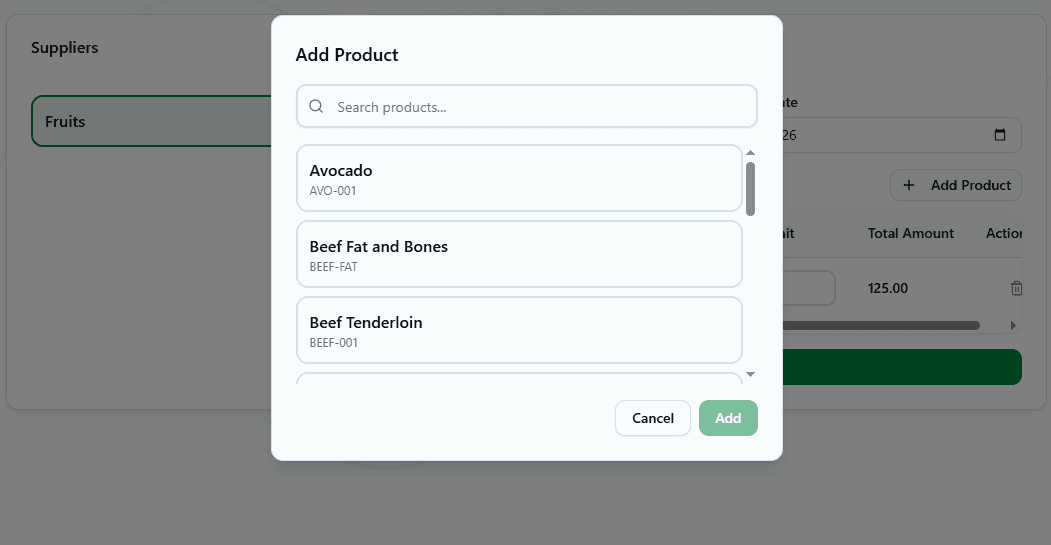
Building orders in a HoReCa system is straightforward. Enter supplier, delivery date, and products - the system handles the rest.
Order Information
Basic Details
- • Supplier name
- • Order date
- • Expected delivery date
- • Order notes/comments
Product Lines
- • Product name from catalog
- • Quantity needed
- • Unit of measurement
- • Expected price
- • Currency
Quick Ordering
Add multiple products at once from your catalog. The system remembers last prices from each supplier to speed up ordering.
Four Order Statuses
Track orders through their lifecycle with clear status tracking for order control:
📝 Draft
Not SentOrder created but not yet sent to supplier. Can be edited freely.
📤 Sent
In ProgressOrder sent to supplier, awaiting delivery. Limited editing allowed.
✅ Fulfilled
CompletedProducts received and receiving act created. Order complete.
❌ Canceled
VoidOrder canceled before delivery. Not fulfilled.
Automatic Receiving From Orders
The smartest feature: create receiving acts directly from purchase orders. No re-entering data, instant connection between ordering and receiving.
How It Works
Delivery Arrives
Supplier brings products to your restaurant
Open Purchase Order
Find the order in "Sent" status matching this delivery
Create Receiving Act
Click button - form auto-fills with all order details
Verify & Adjust
Check actual quantities and prices match order
Confirm Receipt
Order status automatically updates to "Fulfilled"
✓ Perfect Match
Ordered 50 kg chicken, received 50 kg at agreed price. Confirm receiving act and done.
⚠ Partial Delivery
Ordered 50 kg, received only 40 kg. Adjust quantity in receiving act before confirming.
Supplier Management
Maintain a database of suppliers with contact information and ordering history. This supply management food service approach keeps everything organized.
Supplier Information
Track Supplier Performance
- →On-time delivery rate
- →Order accuracy (sent vs received)
- →Price stability over time
- →Product quality issues
Smart Order Planning
Plan orders based on actual needs, not guesswork. The system helps you order the right amount at the right time.
Check Critical Stock Levels
Dashboard shows products below minimum stock. Order these first to avoid running out.
Review Purchase History
See what you ordered last week/month. Repeat regular orders quickly from history.
Consider Lead Times
Some suppliers need 2-3 days notice. Order ahead based on expected delivery dates.
Account for Seasonality
Summer uses more ice, winter more soup ingredients. Adjust order quantities by season.
Real Ordering Scenarios
Weekly Produce Order
RegularTip: Save order as template to repeat weekly with one click
Emergency Meat Order
UrgentTip: Dashboard alerts prevent these emergencies by warning early
Holiday Prep Order
SeasonalTip: Create separate orders for each supplier with early delivery dates
Best Practices
- •Order ahead: Place orders 3-5 days before you need delivery when possible
- •Set expected dates: Always specify when you need delivery for better planning
- •Update statuses immediately: Change to "Sent" when ordered, "Fulfilled" when received
- •Create receiving acts fast: Process deliveries same day to maintain accurate inventory
- •Compare ordered vs received: Track supplier accuracy and address discrepancies
- •Negotiate better prices: Use order history to show volume and negotiate discounts
- •Keep order history: Don't delete old orders - valuable for analysis and audits
Benefits of Digital Ordering
Operational Benefits
- • Never forget what was ordered
- • Track all orders in one place
- • Automatic receiving act creation
- • Complete audit trail
- • Multi-location order management
Financial Benefits
- • Monitor spending by supplier
- • Track price changes over time
- • Reduce emergency rush orders
- • Better negotiating leverage
- • Eliminate duplicate orders
System Integration
Purchase orders connect seamlessly with your entire restaurant operation:
📥 Receiving Acts
Create receiving directly from orders, auto-update status to fulfilled
📦 Product Catalog
Pull products from catalog, remember last prices from suppliers
📊 Dashboard
Critical stock alerts help plan what to order next
⚙️ Settings
Manage suppliers, units, currencies from central location
Take Control of Your Purchasing
Stop losing track of orders in emails and phone calls. Digital restaurant supplier order management gives you complete visibility into what you ordered, when it's arriving, and what you're spending.
From automatic receiving to supplier performance tracking, order history to spending analysis - run your procurement like a pro.
Ready to optimize your purchasing? Start managing orders digitally today.
Free to start. No credit card required.
By continuing you agree to our Terms.