Restaurant Shift Scheduling:
Automated Staff Planning
Minimize conflicts and boost employee motivation with balanced workload distribution through automated shift scheduling.
Creating fair and efficient staff schedules is one of the hardest parts of restaurant management. Too many manual spreadsheets, last-minute changes, confused employees about their shifts, and constant coverage gaps. A digital restaurant shift schedule system solves these problems automatically.
Problems With Manual Scheduling
Paper schedules and Excel spreadsheets create chaos. Staff can't see their hours, managers waste time on constant updates, and payroll calculations take forever. When someone calls in sick, panic sets in trying to find coverage.
Common Scheduling Headaches
Real Cost: Restaurant managers spend 5-8 hours per week on scheduling. That's 20-32 hours monthly just moving names around on spreadsheets.
Visual Calendar System
A good HoReCa staff management system shows all employee shifts in a monthly calendar view. See your entire team's schedule at a glance - who works when, shift times, and any time off.
Calendar Features
Monthly View
See entire month at once for all employees
Shift Times
Start time, end time, and break duration shown clearly
Color Coding
Different colors for work, vacation, sick days, days off
Department Assignment
See which kitchen, bar, or floor each shift covers
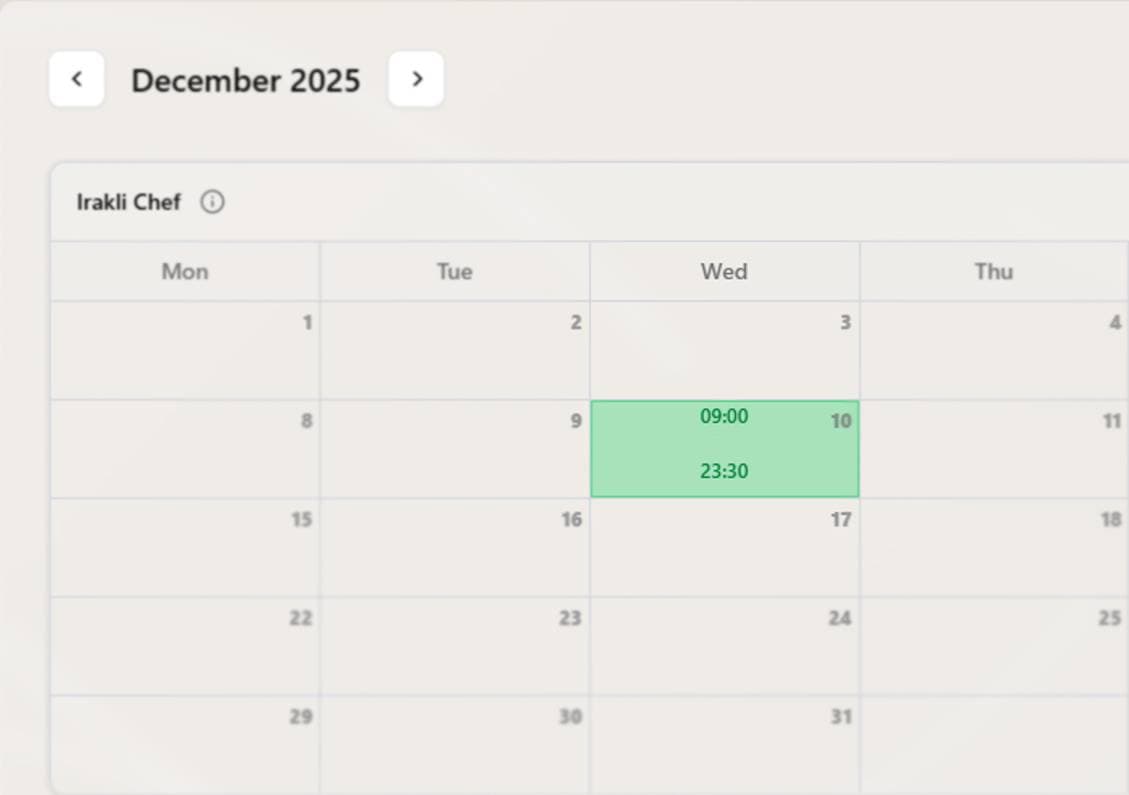
Four Types of Shifts
The system tracks different shift types for complete work time control:
🟢 Work Shift
RegularStandard working shift with set hours
🔵 Vacation
Time OffPaid time off, scheduled in advance
🟡 Sick Day
MedicalEmployee out sick or medical leave
⚫ Day Off
RestScheduled day off in the work schedule
Creating Shifts
Add shifts quickly through an easy form. This schedule automation food service makes planning fast:
Shift Information
Basic Details
- • Employee name
- • Shift date
- • Start time
- • End time
Work Settings
- • Break duration (minutes)
- • Department/Station
- • Shift type
Payroll Options
- • Include breaks in pay?
- • Include vacation in pay?
- • Include sick days in pay?
- • Include days off in pay?
Additional Info
- • Notes/comments
Quick Add: Click any date on the calendar to create a shift for that employee on that day. Form pre-fills with employee and date.
Automatic Payroll Calculation
The system calculates wages automatically based on hours worked and hourly rate. No more spreadsheet formulas or manual math.
Payroll Calculation Formula
Step 1: Calculate Total Hours
Step 2: Subtract Break (if not paid)
Step 3: Calculate Pay
Example Calculation
Copy Previous Month
Save hours of work with one click. Copy last month's entire schedule to the current month automatically. Perfect for restaurants with consistent schedules.
Click "Copy Previous Month"
Available at top of calendar when viewing current or future months
System Copies All Shifts
Every employee's schedule transfers to new month with adjusted dates
Make Adjustments
Edit any shifts that need changes for holidays, special events, or time off
Time Saved: Instead of 4-6 hours creating a new schedule, spend 15-30 minutes making adjustments to the copied schedule.
Employee Statistics
Click any employee's info button to see their monthly summary. Track hours, calculate pay, and spot issues quickly.
Monthly Employee Stats
Number of scheduled work days this month
Combined hours from all shifts (excluding unpaid breaks)
Calculated from total hours × hourly rate ($15/hr)
Practical Scheduling Scenarios
Planning Monthly Schedule
- 1.Use "Copy Previous Month" for base schedule
- 2.Mark holidays and special events as days off
- 3.Add approved vacation requests
- 4.Adjust shifts for expected busy periods
- 5.Review each employee's total hours to ensure fairness
Handling Vacation Requests
- 1.Employee requests time off in advance
- 2.Check calendar for coverage on those dates
- 3.Create shifts with "Vacation" type for approved dates
- 4.Configure if vacation days count toward pay
- 5.Schedule replacement coverage as needed
Managing Sick Days
- 1.Employee calls in sick before their shift
- 2.Change their shift type from "Work" to "Sick Day"
- 3.Find replacement from available staff
- 4.Create new shift for covering employee
- 5.Track sick days for HR and payroll purposes
Best Practices for Fair Scheduling
- •Publish schedules 2 weeks ahead: Give employees time to plan their lives
- •Distribute hours fairly: Check monthly totals to balance workload
- •Rotate weekend shifts: Don't always give same people Friday/Saturday
- •Limit shift changes: Last-minute changes hurt morale and reliability
- •Consider employee preferences: Note who prefers mornings vs nights
- •Track overtime: Monitor who's approaching overtime thresholds
- •Avoid clopening: Don't schedule closing shift followed by opening shift
Benefits of Automated Scheduling
For Managers
- • Save 5-8 hours weekly on scheduling
- • Instant payroll calculations
- • Quick coverage gap identification
- • Complete work history records
- • Fair hour distribution tracking
For Employees
- • Always know their schedule
- • See hours and expected pay
- • Fair shift distribution
- • Easy vacation request tracking
- • Consistent schedule patterns
Integration With Restaurant Operations
Shift schedules connect with other parts of your restaurant system:
📊 Dashboard
Today's shifts appear on main dashboard for quick reference
👥 Employee Management
Uses employee list with names, roles, and hourly rates
🏪 Departments
Assign shifts to kitchen, bar, floor, or other areas
💵 Payroll
Export hours and wages for payroll processing
Stop the Scheduling Chaos
Manual scheduling wastes your time and frustrates employees. Automated restaurant shift schedule systems create fair, balanced schedules in minutes instead of hours.
From visual calendars to automatic payroll calculations, one-click schedule copying to complete work history - give yourself and your team the scheduling system you deserve.
Ready to simplify staff scheduling? Start automating your shifts today.
Free to start. No credit card required.
By continuing you agree to our Terms.