Restaurant Product Management:
Automated Catalog & Tracking
Track expiration dates, prices, and stock levels for efficient menu planning and cost reduction in your cafe or restaurant.
Every restaurant ingredient needs tracking - from fresh produce to dry goods, meats to spices. Without a proper restaurant product management system, you lose track of prices, can't control costs, and run out of critical ingredients at the worst times. A centralized product catalog solves these problems.
Why Product Catalogs Matter
Your product catalog is the foundation of restaurant operations. Every recipe, every inventory count, every purchase order references products from this master list. When your catalog is organized and accurate, everything else works smoothly.
Problems Without Centralized Products
Example: Without a catalog, "chicken breast" might appear as "chicken", "breast chicken", "chick breast" - making accurate tracking impossible.
Essential Product Information
A good HoReCa system tracks complete information for each product:
Required Fields
Optional But Useful
Units of Measurement
Consistent units are critical for ingredient tracking food service. Your system should support all common restaurant measurements:
⚖️Weight
🥤Volume
📦Count
Pro Tip: Use the smallest practical unit. Store "Olive Oil" in liters, not bottles. This makes recipe calculations and inventory counts much easier.
Product Codes (SKUs)
Every product needs a unique code for proper assortment control. Good coding systems make searching fast and prevent duplicates.
Effective Coding Examples
Category-Type-Number format
Simple category-name format
Short category with sequence
Coding Best Practices
- →Keep codes under 20 characters
- →Use consistent separators (dashes work well)
- →Avoid special characters that confuse systems
- →Group similar products with common prefixes
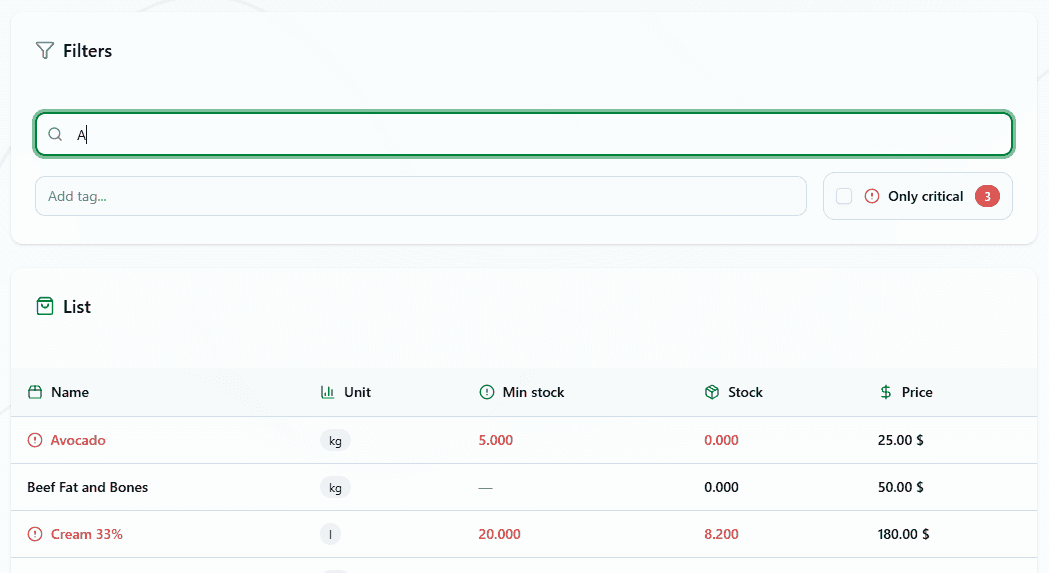
Minimum Stock Alerts
Set minimum stock levels for critical ingredients. When inventory drops below this threshold, the system alerts you automatically - preventing "86'd" menu items during service.
Setting Smart Minimums
Fast-Moving Items
High daily usage - set minimum to cover 2-3 days
Slow-Moving Items
Low usage but essential - minimum = 1 week supply
Long Lead Time Items
Supplier delivers weekly - cover until next delivery + buffer
Dashboard Alert: When stock hits minimum levels, products appear in a critical inventory alert on your dashboard. Order immediately to avoid running out.
Price Management
Track purchase prices for accurate food cost calculations. When prices update from receiving acts, your recipe costs update automatically through product catalog automation.
Price Updates Flow
Multi-Currency Support
Different suppliers use different currencies. Track each product in its purchase currency.
Visual Product Management
Add photos to products for visual identification. This helps with:
✓Staff Training
New employees identify ingredients correctly
✓Inventory Counts
Verify you're counting the right product
✓Receiving Verification
Confirm deliveries match orders
✓Quality Standards
Show what good quality looks like
How Products Connect Everything
Your product catalog is the central hub connecting all restaurant operations:
Recipe Cards
Pull ingredients from catalog, auto-calculate costs when prices change
Inventory Management
Track current stock, run counts, monitor minimums
Purchase Orders
Create orders from catalog, track what's been ordered
Receiving Acts
Update quantities and prices as deliveries arrive
Butchery Acts
Convert raw ingredients into semi-finished products
Write-offs & Waste
Document what gets thrown away and why
Search and Filter Features
With hundreds or thousands of products, finding items quickly is essential:
Search Capabilities
By Name
Type "chicken" to see all chicken products
By Code
Enter SKU for instant lookup
By Unit
Filter all items measured in kg
By Stock Level
Show only low-stock items
Quick Tips
- 💡Start typing to see instant results - no need to press search
- 💡Use filters to narrow results when you have many similar items
- 💡Save common filter combinations for repeated use
Best Practices
- •Use standard names: "Tomato" not "Tomatoes" or "tomato" - pick one format
- •Create codes early: Establish your coding system before adding products
- •Update prices regularly: Accurate prices = accurate food cost calculations
- •Set minimums for critical items: Never run out of your menu essentials
- •Add photos when possible: Especially for specialty or look-alike ingredients
- •Review catalog quarterly: Remove discontinued items, add new products
- •Train all staff: Everyone should know how to search and add products
Common Product Categories
Organize your catalog into logical categories for easier management:
Meats & Poultry
Seafood
Produce
Dairy
Dry Goods
Pantry
Benefits of Organized Product Management
Cost Control
- • Accurate food cost tracking
- • Real-time recipe cost updates
- • Identify price increases quickly
- • Make informed menu pricing decisions
Efficiency
- • Faster inventory counts
- • Quick purchase order creation
- • Reduced data entry errors
- • Streamlined receiving process
Build Your Product Foundation
A well-organized restaurant product management catalog is the foundation of profitable operations. Track prices, monitor stock, and control costs from one central system.
Stop losing money to disorganized ingredients, outdated prices, and stock-outs. Start with a proper product catalog.
Ready to organize your ingredients? Start building your product catalog today.
Free to start. No credit card required.
By continuing you agree to our Terms.